
• Don't miss our webinar: Take Your Omnichannel CX to New Heights: How Spirit Airlines Is Upgrading Self-Service with Agentic AI  Watch now -->

Asynchronous Messaging: How to Use it to Deliver Exceptional Customer Service

Key Takeaways

  • Asynchronous messaging lets people send and respond to messages on their own schedule without needing to be online at the same time.
  • Asynchronous messaging helps teams minimize context switching and stay focused by eliminating the pressure to respond immediately.
  • Async communication works especially well across time zones, ensuring progress continues even when schedules don’t overlap.
  • It’s ideal for feedback, updates, documentation, and questions that don’t require a real-time discussion.
  • Asynchronous messaging works best with clear communication. Setting response-time norms ensures async messaging stays efficient and avoids unnecessary delays.

Messaging is good. Asynchronous messaging is better.

Let’s face it. Customers have little tolerance for inconveniences of any kind. Whether that’s waiting around for a response, repeating information, or finding an immediate solution to their problem.

Customer service teams aim to serve, so having the available channels to give customers the exact experience they want is crucial to increasing customer satisfaction.

What is asynchronous messaging?

Asynchronous Messaging is a communication method where two parties don’t need to be present or active at the same time for the conversation to continue. Messages are sent and received on each person’s own schedule, allowing for flexible, delayed responses like email, SMS, or chat systems, where replies can come minutes or hours later.

What does asynchronous messaging actually look like? Imagine you’re the customer. You’re busy but need help returning a pair of boots (that just aren’t your style) that your well-meaning dad bought you for your birthday. A completely random example…

You reach out to the live chat service on the eCommerce website to initiate the return, but you’re interrupted midway through the conversation. There’s an immediate work problem that needs your attention. The kids are fighting. The sky is falling. Whatever it may be, you have to start the process all over again.

Frustrating, right? It’s just a simple return!

Well, asynchronous messaging (sometimes called async messaging or asynchronous chat) takes the stress out of that conversation. It doesn’t require both parties to be present at the same time to complete the interaction. You can simply jump back in once you’ve taken care of life’s responsibilities. This is asynchronous messaging at its best.

SMS/text messages, WhatsApp, and Facebook Chat are all prime examples of asynchronous messaging in action. Conversations can start, stop, and resume whenever either person is available.

Synchronous vs Asynchronous Conversations

At the other end of the spectrum is synchronous messaging. It’s typically a live, one-to-one chat between a customer and a customer service representative.

What makes it so different? There’s usually a clear beginning and end to a synchronous chat. A customer reaches out with a specific question or to find a solution to their problem, and the conversation ends once those needs are met.

Think of it like a typical phone interaction—just using messaging instead of voice. And since synchronous messaging is so similar to phone interactions, it often comes with the same drawbacks.

  • Customers have to wait for a live agent.
  • If the agent can’t answer a question, the customer has to be rerouted.
  • Agents can only serve one person at a time.
  • Complex problems take up more of your agents’ time.
  • If a customer gets interrupted, the chat ends without a resolution.

Think of asynchronous messaging somewhere between live chat and email. Customers typically expect a quick,—but not instant, —response. This flexibility allows your team to deliver exceptional customer service atin a time that works for the customer and your team.

But that’s not the only benefit. Here are seven benefits of adding asynchronous messaging to your customer service arsenal.

  1. Customers can fit you into their busy days. Life is busy. We’re always multitasking. There are too many distractions—it’s a lot. Asynchronous messaging gives customers the flexibility to fit you into their schedules. They don’t have to block time out of their day for a lengthy live chat or wait for business hours to get someone on the phone. Instead, they can get their support requests taken care of on their own time, at their own pace.
  2. Less wait time. Since agents can jump in and out of multiple conversations—as many as 30 at a time—customers spend less time “on hold” waiting to connect with a live agent. And that is really important to customers. Zendesk reports that over 60% say getting their issues resolved quickly is the most important aspect of good customer service. With asynchronous messaging, customers can get answers while going about their day.
  3. No repeated information. One of the things that frustrates customers the most is having to repeat their problem. No matter whether they get disconnected from a live chat or transferred to multiple people before they get an answer to their problem, repeating themselves almost always leads to a bad experience. With asynchronous messaging and a conversational platform behind it, customers (and agents) can pick up the conversation right where they left off. There’s no information lost between sessions. Their conversation history is available for agents to reference at any time.
  4. Resolve problems in less time. While asynchronous messaging potentially drags out conversations (depending on how quickly your customers respond), agents often spend less working time per interaction. Quiq clients can reduce work time by 25–40% when converting calls to messaging. This is because agents can quickly address those frequently asked questions that don’t necessarily require a phone call (think password reset process and hours of operation). Simple problems get solved faster, while more complex problems have the breathing room to come to a thorough resolution.
  5. Prioritize customer requests. During peak times, when your team is truly overwhelmed, asynchronous messaging helps your agents triage customer requests. Collect customer information, sentiment, and problem upfront to determine how quickly the problem needs to be addressed. A customer service agent can immediately help an angry customer with a simple problem and close out the ticket quickly. A neutral person with a more complex question can wait a little longer for your agents to figure out the right response.
  6. Asynchronous messaging agent efficiency customer engagement performance channels sms facebook instagram whatsapp conversationsMeet support demands with fewer agents. Much like phone calls, synchronous messaging requires one agent per customer interaction. To meet demand and avoid long wait times, you need a higher volume of staff members at all times. This also means that you likely have to hire extra team members to support peak times. Asynchronous messaging can help with that. Since your support team can take part in multiple conversations at once, you can serve more customers with fewer agents. This is particularly helpful now when baseline support ticket requests have gone up 20% since the beginning of the pandemic, according to Zendesk.
  7. Get more opportunities to initiate a conversation. Since conversations are more flexible, customers are more likely to engage with customer service reps at different stages within the the customer lifecycle. Customers don’t have to set aside big chunks of time for conversations and your team will have more context to help serve them better. From starting a conversation from Maps with Apple Messages for Business or using Facebook Messenger to ask about size options, there’s ample opportunity to serve customers and increase revenue.

How to Make the Most Out of Asynchronous Messaging

Messaging as a whole has significantly grown in popularity since the pandemic began, and it has done so at a faster rate than any other channel. Support tickets coming in from messaging channels rose by 48%, compared to a 15% increase from live chat.

If you haven’t embraced asynchronous messaging yet, we have a few best practices to shape your approach and help you get started.

  • Design your asynchronous messaging strategy around your agents waiting for the customer—not the other way around. While it gives your agents the ability to manage multiple conversations, the benefit should really be for the customers’ flexibility. If you use asynchronous chat to spread your team too thin, the experience can end up feeling like email, which no one likes.
  • One way to improve response times and decrease the time agents spend per interaction? Use a chatbot to welcome customers and collect pertinent information beforehand. This way, customers get served quickly, and agents can spend their time problem-solving instead of gathering information.
  • Want to stand out? Don’t treat messaging like email. In 2020, Zendesk reported that it takes more than 11 hours, on average, to close messaging tickets. That’s compared to 30 minutes for voice and live chat and 11.5 hours for email or web form tickets.
    While messaging gives your team more flexibility to respond, customers still expect a response time in under 5 minutes. Try staffing it as you would with voice and live chat to start. Then, adjust as your team becomes more efficient and you invest in other ways to streamline service.
  • Remember to track actual work time. Overall, asynchronous messaging will have high-resolution times since you can resolve issues in two minutes, two hours, or two days. Giving customers the freedom to respond at their own convenience can superficially elevate those numbers. But remember: if a customer is responsible for the delay, a two-day conversation can result in a lower work time and a higher customer satisfaction rate. So take resolution times with a grain of salt. A conversational platform like Quiq can help you measure actual work time.

Start Using Asynchronous Messaging to Deliver Stellar CX

With customers flocking to messaging channels, it’s a great time for your customer service team to adopt asynchronous messaging. The best way to set your team up for success? With an Agentic AI platform, like Quiq.

Turn any messaging channel into an asynchronous experience. With Quiq, you can:

  • Manage conversations across multiple channels
  • Serve customers based on sentiment
  • Increase agent efficiency and boost customer satisfaction

Sign up for a Quiq demo and see how it can help you deploy asynchronous messaging and elevate your customer service.

Frequently Asked Questions (FAQs)

What is asynchronous messaging?

Asynchronous messaging is a communication method where messages are sent and received without requiring both parties to be present or active at the same time. It allows people to respond on their own schedule.

How is asynchronous messaging different from synchronous messaging?

Synchronous messaging requires real-time interaction (like phone calls or live chat), while asynchronous messaging supports delayed responses (like email or Slack messages).

What are common examples of asynchronous messaging?

Email, SMS/texting, project management comments, voicemail, collaborative tools like Slack or Teams, and ticketing systems all use asynchronous communication.

Why is asynchronous messaging important for teams?

It helps reduce interruptions, supports global or distributed teams across time zones, and allows people to respond more thoughtfully rather than immediately.

When should I use asynchronous messaging instead of synchronous communication?

Use it for non-urgent questions, feedback, updates, documentation, or anything that doesn’t require an immediate back-and-forth discussion.

Does asynchronous messaging hurt productivity?

Not when managed well, it’s often more productive. It reduces context switching, allows deep work, and creates a written record of decisions and conversations.

Can asynchronous messaging work for customer support or sales?

Yes. Many support and sales workflows now use async channels like email, in-product messaging, or chat with delayed response, offering flexibility for both reps and customers.

Are there downsides to asynchronous messaging?

If expectations aren’t clear, delays can happen. It’s helpful to set response-time norms so communication stays efficient.

How does asynchronous messaging improve documentation?

Everything is written, searchable, and trackable, making it easier for teams to revisit decisions, share knowledge, and onboard new members.

Can asynchronous and synchronous messaging be used together?

Absolutely. Many teams blend both asynchronous for everyday communication and synchronous methods (meetings, calls) for urgent or complex discussions.
Rich Communication Services – A Guide for CX Leaders

Key Takeaways

  • What RCS Adds: An upgrade to SMS/MMS with rich media, read receipts, typing indicators, and interactive elements, built right into native messaging apps.
  • Apple’s Big Step: With iOS 18 (2024), Apple joined Google in supporting RCS, enabling seamless, feature-rich messaging between iPhone and Android users.
  • Why It Matters for CX: Businesses can deliver branded, interactive experiences, like verified agent chats, surveys, carousels, and order updates, without requiring extra app downloads.
  • The Bigger Picture: RCS combines the reach and trust of SMS with the engagement of OTT apps (WhatsApp, iMessage), making it a strong contender for the global messaging standard.

If by chance you haven’t heard of this new frontier in text-based customer communication, your first question is probably, “What is rich messaging?”

Well, you’re in luck! We wrote this piece specifically to get to the bottom of this subject. Here, we offer a deep dive into rich messaging, the capabilities it unlocks, and its implications for CX. By the time they’re done, CX directors will better understand why rich messaging should be central to their customer outreach strategy and the many ways in which it can make their job easier.

What Is Rich Messaging?

Rich messaging aims to support person-to-person or business-to-person communication with upgraded, interactive messages. Senders can attach high-resolution photos, videos, audio messages, GIFs, and an array of other media to enhance the receiver’s experience while conveying a lot more information with each message.

Google’s Rich Communication Services (RCS), for example, is one approach to rich messaging, but it is not the same thing as rich messaging in general.

For a number of reasons, rich messaging applications have supplanted SMS in both personal and professional outreach. SMS messages simply do not support many staples of modern communication, such as group chats or “read” receipts. What’s more, the reach of SMS will remain limited because it requires a cellular connection, whereas rich messages can be sent over the internet.

Though SMS will probably be around for a while, rich messaging is becoming increasingly popular as companies have been trending toward greater use of applications like WhatsApp.

With RCS, businesses don’t need a separate app —modern features like typing indicators, read receipts, and media sharing are available directly in the phone’s native messaging app (Google Messages, Apple Messages). This allows CX leaders to deliver rich, branded, and secure experiences tied to a customer’s mobile number without forcing app downloads.

Armed with these and similar channels, CX directors can now:

  • More easily capture new customers with compelling outreach.
  • Resolve customer issues directly via text, chat, or social media messaging (a huge advantage given how obsessed we’ve all become with our phones);
  • Interact with customers in real-time, which is a capability more and more people are looking for when seeking help.
  • Gather and act on analytics.
  • Scale their communications while simultaneously reducing the burden on contact center agents.

Given these facts, it’s no surprise that more and more CX leaders are making texting a key component of building lasting customer relationships.

What is Rich Messaging on Different Platforms?

Now that you have more perspective on what rich messaging is and what it offers, let’s spend some time talking about which platforms you should focus on.

There are a few major providers of rich messaging, but we’ll focus on Apple and WhatsApp. Apple has long been a communication giant, but with billions of users worldwide, Meta’s WhatsApp has certainly earned its spot at the table.

The sections below provide more details about how rich messaging works on each platform.

What is Rich Messaging on Apple?

Through Apple Messages for Business, contact centers can offer their customers a direct line of communication. This allows for far greater speed and convenience, to say nothing of the personalization opportunities opened up by artificial intelligence (more on this shortly).

What is Rich Messaging on WhatsApp?

WhatsApp is a widely used application that uses rich messaging for texts, voice messages, and video calling for over two billion users worldwide. Utilizing a simple internet connection for its services, WhatsApp allows users to bypass the traditional costs associated with global communication, making it a cost-effective choice.

It supports integration with tools like the Quiq agentic AI platform, which can automatically transcribe voice messages and allows for the export of these conversations for analysis using technologies like natural language processing.

For more information, check out our dedicated article on WhatsApp Business.

RCS vs. SMS vs. MMS vs. OTT: Understanding the Key Differences in Messaging

As consumer expectations have grown, so has the need for messaging technology to evolve. Businesses can no longer rely solely on traditional SMS to deliver standout experiences, especially when customers are used to rich, app-like interactions. That’s where understanding the differences between messaging types comes in.

From basic texts to interactive messages with buttons, images, and videos, here’s how SMS, MMS, RCS, and OTT messaging stack up:

What is SMS?

SMS (Short Message Service) is the most basic form of text messaging. It has a 160-character limit and doesn’t support media like images or videos. Despite its simplicity, it’s still widely used for short, timely notifications and reminders.

What is MMS?

MMS (Multimedia Messaging Service) expands on SMS by allowing users to send pictures, videos, and audio. It relies on mobile data and carrier support, and can be more expensive to send—especially at scale.

What is RCS?

RCS (Rich Communication Services) takes messaging to the next level with features like read receipts, typing indicators, carousels, high-resolution media, interactive buttons, and branded customer experiences via verified RCS Agents. It’s carrier-dependent and still gaining traction, but it offers a powerful upgrade for business-to-customer communication while running over Wi-Fi or data networks instead of the cellular voice network

What is OTT Messaging?

OTT (Over-the-Top) messaging apps like WhatsApp, Facebook Messenger, and Apple’s iMessage work over the internet and bypass traditional carriers altogether. These platforms offer end-to-end encryption, rich media, and global reach, making them a go-to for brands looking to meet customers where they are.

RCS also enables businesses to create branded, interactive customer journeys. Features like carousels, surveys, order updates, and suggested reply buttons allow for more engaging experiences while increasing trust with verified sender IDs.

Key Features and Benefits of Rich Messages

Whether on Apple, WhatsApp, or another channel, rich messaging is one of the best ways of interacting with customers; it’s convenient and powerful enough to help a CX leader rise above their competition.

At its core, rich messaging is defined by key features such as high-resolution photos and videos, read receipts, typing indicators, branded buttons, quick reply options, and interactive carousels, all within the customer’s native messaging app. These features create smoother, faster, and more trusted interactions compared to traditional SMS or MMS.

Below, we will get into more specifics about the advantages to be had from using rich messaging.

1. Cost-Effectiveness

Because it works over the internet, rich messaging is a great way for CX directors to connect with customers without breaking the bank.

But it can also help your organization save money by reducing customer support costs. When consumers need to talk to someone at your business, they can speak to knowledgeable agents (or a large language model trained on those agents’ output) through your rich messaging platform.

In this same vein, rich messaging makes it far easier to engage in asynchronous communications. This means agents are able to handle multiple conversations at the same time, resulting in further savings.

Finally, rich messaging is far more scalable than almost any other approach to customer outreach, especially when you effectively leverage AI.

2. Real-Time Insights

When they integrate rich messaging with a platform offering excellent support for real-time analytics, companies gain access to conversation analytics that provide the insights they need to improve contact center performance.

They can generate reports on click rates and other helpful interaction metrics, for instance, giving CX leaders a feedback loop they can use to test changes and see what improves customer satisfaction, loyalty, and lifetime value.

3. Rich Messaging is Native to the Devices Customers are Already Using

You could pay for the most compelling billboard in the history of marketing, but if it’s on the moon where no one will see it, it’s not going to do you much good. For this reason, we’ve long pointed out that it’s important to meet your customers where they are – and these days, they’re on their phones.

When combined with the statistics in the following section, we think that the case for rich messaging as a central pillar in the CX director’s communications strategy is very strong.

4. Increased Engagement

As it turns out, text messaging consistently achieves higher open and response rates compared to other methods. Adding elements like tappable carousels, suggested replies, and rich media further boosts engagement by making every message interactive and visually compelling.

This high level of engagement demonstrates the significant potential of text messaging as a communication strategy. Considering that only about 25% of emails are opened and read, it becomes clear that investing in text messaging as a primary communication channel is a wise decision for effectively reaching and engaging customers.

5. The Human Touch (but with AI!)

Rich messaging lets brands personalize conversations at scale with the help of AI. Machine learning powers this personalization, the same tech behind Netflix recommendations. Now, thanks to advancements in agentic AI, this same technology is being integrated into text messaging.

Previously, language models lacked the necessary flexibility for personalized customer interactions, often sounding mechanical and inauthentic. However, today’s models have greatly enhanced agents’ abilities to adapt their conversations to fit specific contexts. While these models haven’t replaced the unique qualities of human interaction, they mark a significant improvement for CX directors aiming to improve the customer experience, keep customers loyal, and boost their lifetime value. What’s more, when used over time, these innovations will help a CX leader stand out in a crowded marketplace while making better decisions.

To make use of this, though, it helps to partner with a platform that offers this functionality out of the box.

6. Security

Trust and transparency have always been important, but with deepfakes and data breaches on the rise, they’re more crucial than ever. Some rich messaging applications, like WhatsApp, support end-to-end encryption, meaning your customers can interact with you knowing full well that their information is safe.

But, to reiterate, this is not the case for all rich messaging services, so be sure to do your own research first.

What is Rich Messaging? It’s the Future!

Rich messaging is the technology that makes this possible, and it’s even more impactful when you partner with a platform like Quiq that enables personalization, analytics, and better engagement with your customers. Read more here to learn about the communication channels we support!

Frequently Asked Questions (FAQs)

What exactly is Rich Communication Services (RCS)?

RCS is the modern upgrade to SMS and MMS. It lets you send high-resolution photos and videos, see when someone is typing or has read your message, and interact through branded buttons or carousels, all from the phone’s built-in messaging app.

How does RCS differ from SMS or MMS?

SMS is limited to short text, MMS adds basic media, but RCS goes further. It creates an app-like experience inside the default inbox, complete with interactive elements, analytics, and branding opportunities that drive stronger engagement.

Does Apple support RCS now?

Yes. With iOS 18 (2024), Apple rolled out RCS support. That means iPhone users can finally exchange rich messages with Android users, bringing features like upgraded group chats, read receipts, and high-quality media into play.

How does RCS compare with apps like WhatsApp or Messenger?

WhatsApp and Messenger require separate downloads, while RCS is built right into your phone number and default messaging app. OTT apps still shine with global reach and encryption, but RCS offers something unique: direct, branded communication in the channel customers already use every day.

How are businesses putting RCS to work?

Companies are using it to design interactive journeys, think order updates, quick-reply buttons, customer surveys, or scrolling product carousels. Paired with verified business profiles, RCS builds trust while keeping conversations efficient and engaging.

 Is RCS secure?

Security varies by implementation, but many carriers and providers now offer end-to-end encryption for RCS. Combined with verified sender IDs, it helps ensure customers can trust the conversations they’re having with your brand.

Request A Demo

Top 3 Things to Know About Apple Messages for Business

Key Takeaways

  • Apple Messages for Business offers a native, seamless channel. It allows customers to message a business directly via the iOS/macOS Messages app – accessible from Maps, Search, Safari, Siri, or within your app.
  • It supports rich, interactive experiences. Beyond plain text, you can send images, links, lists, schedule appointments, accept payments via Apple Pay, use augmented reality, and more.
  • It enables both automated and human-powered interactions. You must have live agents available, but you can also layer in AI agents to handle common tasks to provide 24/7 service.
  • There are strategic advantages to adoption. Use Message Suggest to shift traffic from calls to messaging, enhance your brand presence in Apple’s ecosystem, and reduce friction by meeting customers in a familiar channel.

How much do you know about Apple Messages for Business?

We know what you’re thinking. Not *another* messaging platform.

But hear us out. Business Messages is one of the most organic messaging experiences you can offer your customers.

There’s no denying that Apple knows how to create a great customer experience. From their Genius Bars to their MacBook packaging, there’s care and attention paid to every small detail.

And that extends to their Business Messages feature. We’re answering three basic questions to help you discover what it is and how to use it to improve your customer experience below.

What is Apple Messages for Business?

Apple Messages for Business allows users to connect with your business through Apple’s native Messaging app on their iOS- or macOS-enabled devices. With more than 1 billion iPhone users, you have a simple way to connect with your customers.

When you enable Apple Messages for Business, users get one-on-one access to your representatives directly in Maps, Safari, Search, Siri, Spotlight, and even within your iOS app. All they have to do is click the messaging icon, and they’re taken to their messaging apps.

Your customers don’t need to navigate through an automated phone tree, search for an email address on your website, or download an app—they can simply open up the Messages app and start chatting with a customer service representative right away.

What can you do with Apple Messages for Business?

Besides enabling customers to connect with you as easily as they do with their favorite people, Apple Messages for Business offers a variety of features you can leverage to improve your customer experience.

Rich messaging

So much more than a text. Rich messaging allows you to send images, links, share a location, read receipts and more.

Send a rich link that displays website information from within the message. Customers can verify it’s the information they’re looking for before tapping the link, and they’re provided an easy way to get back to the conversation after they’ve visited the site.

Retailers can use messaging to send product images, insurance companies can ask for pictures of car damage, or you can share nearby brick-and-mortar locations.

Appointment scheduling

Let customers schedule appointments right from within messaging. Customers can see if it conflicts with their schedule, automatically add the appointment to their iCal, and get reminders to ensure they don’t miss it.

Augmented reality

Help customers decide if a product fits in their home. Using their iPhone camera and augmented reality, customers can visualize a product in their homes.

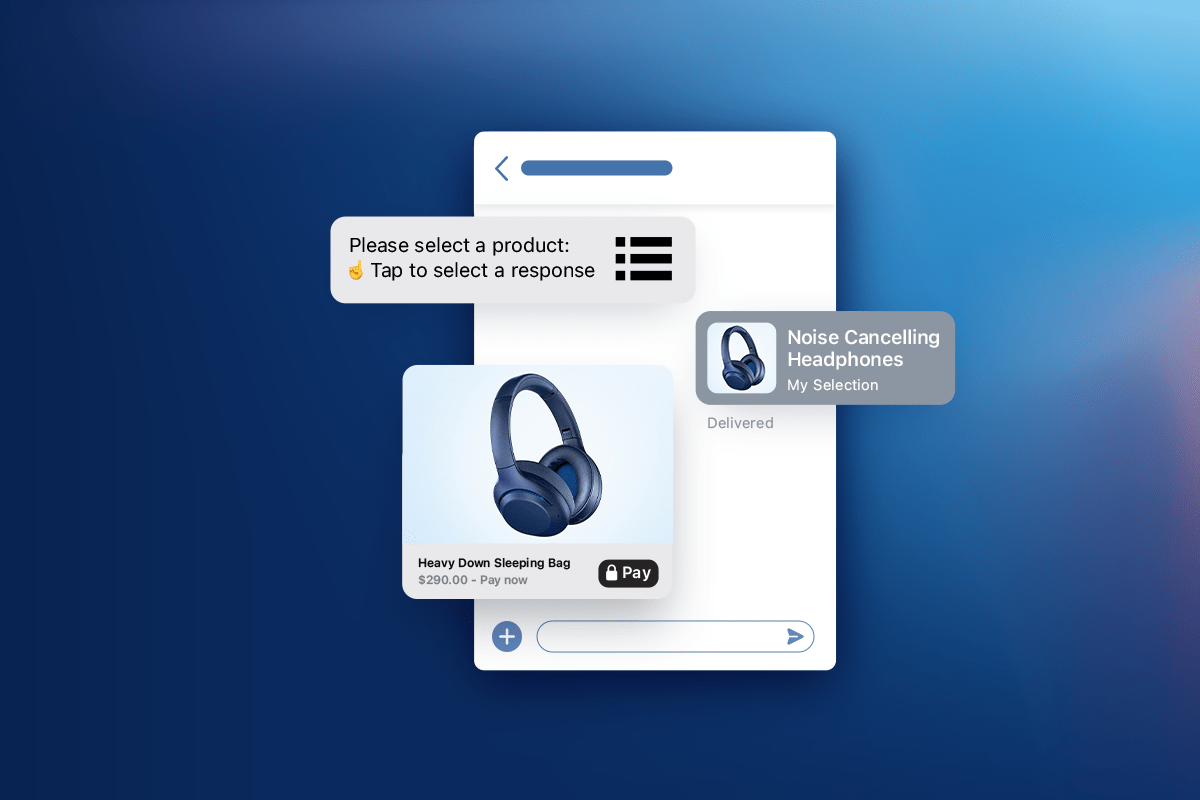
List picker

Simplify customer choice by letting them pick from a pre-populated list. Use it to help them pick locations, item size, color, or service.

pay to chat apple pay

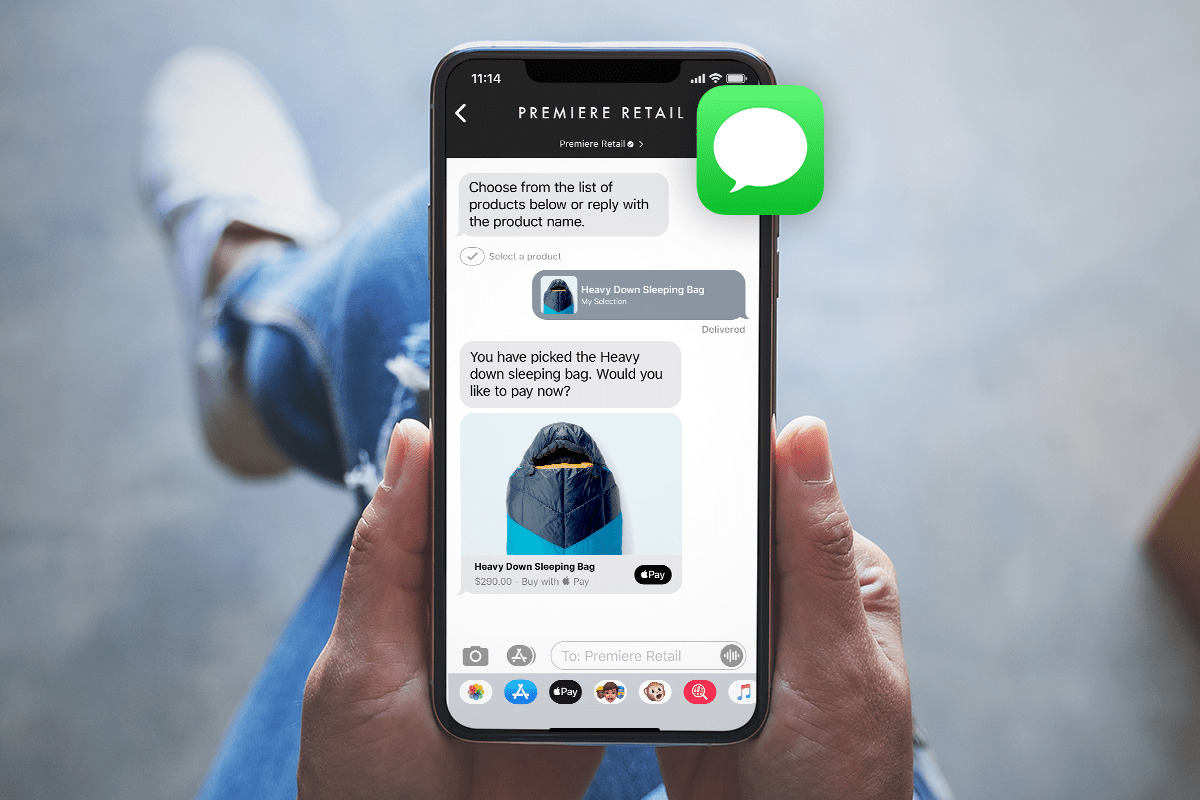
Accept payments with Apple Pay

Eliminate abandoned carts by completing sales right within Messages. You can send payment requests with Apple Pay and make it so much easier for customers to complete a transaction. No more entering in extra information, and no getting up from the couch to get your credit card… Just instant gratification.

Collect (secure) customer information

What’s one thing customers hate most about customer service? Having to repeat themselves and give out their information to multiple people. Apple Business Chat removes this obstacle by providing the customer information you need. Plus, messages are long-lived. No matter when a customer reaches out, their previous conversation will live in the messaging platform so you can pick up right where you left off. Just like messaging a friend.

What are the benefits of using Apple Messages for Business?

Apple Messages for Business provides many opportunities to delight customers while still streamlining your customer support process. Benefits of Apple Messages for Business include:

  1. The ability to encourage messaging with Message Suggest.
  2. Delivery of a seamless customer experience.
  3. Incorporation of both live agents and chatbots.

Encourage messaging with Message Suggest

Typically, customers can message you by tapping a messaging icon. But you can boost messages and reduce your call volumes with Apple Message Suggest. Customers can tap on your business phone number from anywhere within iOS or macOS, including websites, social media, business directories, etc., and they’ll be given the option to message instead of call.

Adding Message Suggest can help reduce call volume and drive traffic to messaging, which is often more efficient and cost-effective.

Deliver a seamless customer experience

Think of Apple Messages for Business as an extension of your brand experience. You control your business contact info the user sees when they search your name, including logo, contact information, and more.

You can even customize the call-to-action text for Apple Suggest. Instead of the standard, “Why call when you can message?”, consider a simple “Text us” or an encouraging “Get faster service when you send a text.”

Incorporate both live agents and chatbots

One of the requirements for having an Apple Messages for Business account is having live agents available to respond to customer inquiries. But that doesn’t mean you have to have someone at the ready at all times. You can still use AI agents at specific points of the interaction to ensure instant service at all times.

Use bots to:

  • Welcome customers
  • Automate the checkout process
  • Gather customer information
  • Troubleshoot simple customer issues
  • Collect feedback

Since messaging can happen at any time, you can use bots to service customer questions 24/7, such as:

  • Checking order statuses
  • Canceling an order
  • Scheduling appointments
  • Confirming account balances

You can still utilize bots to help you deliver the best experience to your customers while tapping in live agents to provide that one-on-one support.

Take a deep dive into Apple Messages for Business.

We’ve just scratched the surface on what you can do with Apple Messages for Business to surprise and delight your customers. By giving customers a way to connect with your business that they know, love, and use daily, you’re creating a comfortable and inviting experience for them. P.S. To use Apple Messages for Business, you’re required to use a messaging service provider like Quiq.

Frequently Asked Questions (FAQs)

What is Apple Messages for Business?

It’s a native iOS and macOS feature that lets customers message your business directly through Apple’s Messages app – from Maps, Safari, Siri, or your app without needing to call or email.

What features does Apple Messages for Business offer?

Businesses can send rich messages, schedule appointments, collect secure customer information, enable augmented reality previews, and accept Apple Pay payments within chat.

How does Apple Messages for Business improve customer experience?

It streamlines support by removing friction – customers can start conversations instantly and pick up where they left off, similar to texting a friend.

Can Apple Messages for Business integrate live agents?

Yes. Companies must have human agents available, but can also automate common requests using AI agents to provide 24/7 support.

What are the main benefits for businesses?

It helps reduce call volumes with Message Suggest, builds trust through Apple’s secure ecosystem, and enhances brand perception with a seamless, familiar messaging experience.

5 Tips to Transform Your Customer Service in 2020

As consumers continue to spend more time at home, maintaining an effective online customer service presence is becoming more necessary than ever for businesses. Today’s customers have a lot of questions and expect a fast, first-class experience and personalized answers. Agents who aren’t using modern digital channels like SMS/text, web chat, and social direct messaging or leveraging the power of chatbots will struggle to keep up with multiple requests.

It’s not by chance that smart communication technology exists that can improve your customer service and provide greater convenience for your company and your customers. This list highlights the top customer experience trends for 2020 and how businesses are modernizing and improving customer service.

1. Offload Expensive Phone Calls to Messaging

It takes significant time and resources for a human agent to answer calls. As talented as humans are at multitasking, it’s impossible to juggle multiple, simultaneous phone calls. By offering options for text and live chat on your website, your business gives a caller the option to switch to a digital channel and engage with an agent immediately instead of waiting on hold.

Both messaging channels allow customers to respond to the message at their convenience. The end result is a more seamless experience for the customer when their needs aren’t put on hold.

2. Utilize Chatbots

Chatbots are automated programs that deliver information in a conversational way, like a human agent. Unlike a human agent, chatbots can handle countless requests simultaneously with almost instantaneous response times.

Chatbots can step in for agents experiencing over-crowded queues and quickly resolve basic requests — like scheduling appointments, collecting feedback, troubleshooting an issue, or answering the age-old question: “What is my order status?” But don’t think chatbots are simply used in place of human agents. Think of it as chatbots alongside human agents.  

It’s true, chatbots, in many cases, can resolve customer inquiries without the intervention of a human agent but chatbots can be introduced at any point in the conversation to augment the work done by humans. For example, a chatbot could greet customers and collect important information prior to handing the conversation over to a human agent. 

In another scenario, the human agent could transfer a conversation to a bot to collect information in the middle or end of a conversation. Once the bot has completed collecting information, the conversation is transferred back to the human agent. Bots can quickly handle the routine and repetitive tasks, like collecting order information, freeing up human sales, and service resources to focus on the more high-value tasks.

3. Transform Messages to the Richest Format

The easiest way to modernize your customer service to keep up with customer expectations is to send messages that match the sophisticated digital experiences they’re familiar with (think emojis, videos, photos, and memes). With rich communication services, businesses are able to send rich messages (cards, carousels, suggested replies) that exemplify the brand across all of the supported channels in the more modern ways customers are already using today, with their family and friends.

4. Adopt Mobile Messaging & On-Demand Service

The majority of Americans own a smartphone and carry around the capabilities to research, shop, and purchase products wherever they go. Optimize your website for mobile viewing so the answers customers want are just a tap away. With mobile messaging and on-demand, real-time service, contact with a representative from your company is immediate through text rather than dialing a number.

5. Implement Live Web Chat

Live chat is already a popular alternative to traditional calls, evidenced by expanding presence in business plans and rising satisfaction rates among customers who use it. In the same way your website is live 24/7, your customers expect agents to always be available. On-demand agents solve the challenge of your business’s schedule having to align with your customer’s. For organizations that do not have agents around the world in different time zones, a reliable chatbot offers around-the-clock messaging.

Use Quiq to Improve Customer Experience

Creating informative and adaptive communication is simple with Quiq messaging services. To learn more, contact us or schedule a live demo today.

See a Demo Today